Design from the device outward: the screen reads a local store, a repository keeps that store in sync, writes are queued and safe to retry, and push is a hint to sync, not a data channel. Name the platform limits that force each choice, and say how the design behaves offline, in the background and on an old app version.
How the mobile round differs from backend system design
Both rounds test structured thinking under ambiguity, and both start with requirements. The difference is where the hard constraints live. A backend answer is shaped by request volume and data size. A mobile answer is shaped by a single device that loses its network in an elevator, is suspended when the user switches apps, and may run a version of your code released a year ago.
That changes what counts as a deep dive: sharding and consensus rarely come up, while pagination, sync, images, push and lifecycle do. You still need enough backend literacy to specify the API you depend on, and to say what you would require from the server to keep the client simple.
| Topic | Backend round | Mobile round |
|---|---|---|
| Main object | Services, storage, queues | One app: screens, state, data layer, API contract |
| Scale question | Requests per second and data volume | Battery, memory, flaky network, background time |
| Failure model | Node, zone and dependency failures | Offline, a killed process, lossy network, old app versions |
| Consistency | Replicas and partitions | Local store versus server, conflicts after offline edits |
| Deployment | Roll forward or back quickly | Store review, staged rollout, users who do not update |
| Typical deep dives | Sharding, caching tiers, queues | Pagination, sync, images, push, lifecycle |
A twelve-step framework with a 45-minute budget
The twelve steps: requirements, API contract, client architecture, data layer, offline and sync, pagination, caching and images, push, background-work limits, errors and retries, observability, release. That is too many to give equal time, so the table groups them into six phases; decide in advance where you will go deep. The budget uses 43 minutes and leaves two for your questions.
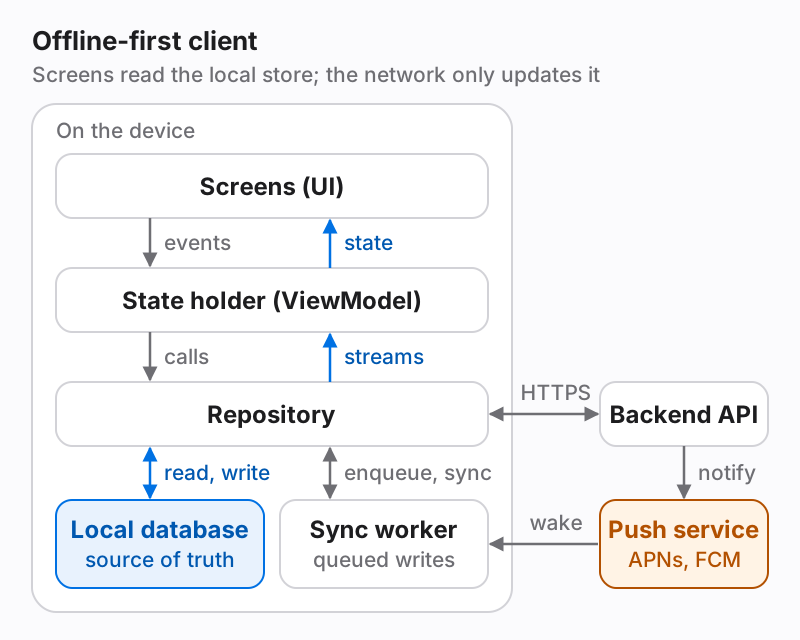
Say the plan out loud in the first minute. It shows you will reach the mobile-specific topics, and it lets the interviewer redirect you early if they want most of the time on sync and none on release. Draw one diagram and keep extending it; the layered diagram in the worked example is a reasonable default.
| Phase | Steps covered | Minutes |
|---|---|---|
| Scope | Requirements: screens, offline expectations, platforms, out of scope | 5 |
| Contract | API endpoints, payload shape, pagination, errors | 5 |
| Client | Architecture layers and the local data model | 10 |
| Data flow | Offline and sync, pagination, caching and images | 10 |
| Events and limits | Push, background work, errors and retries | 8 |
| Operating it | Observability and release | 5 |
| Buffer | Your questions for the interviewer | 2 |
Platform limits that shape the design (Apple and Android docs)
Mobile designs are credible when each choice is tied to a documented limit. The table collects the limits this guide relies on, as written in Apple's and Google's developer documentation on November 14, 2026. They change between OS releases, so recheck them before an interview and say “as documented” instead of quoting numbers as permanent.
Three consequences follow. First, you cannot count on an open socket or a timer once the app is in the background, so background freshness comes from push plus short, system-scheduled work. Second, a push payload is capped at 4,096 bytes on both platforms, and pushes that only wake the app are low priority and may be throttled on both, so push can signal a change but cannot be the channel your data depends on. Third, work that must finish, such as an upload, belongs to an API built to outlive your process: a background URLSession on iOS, WorkManager on Android.
| Constraint | iOS | Android |
|---|---|---|
| Leaving the foreground | applicationDidEnterBackground has five seconds; beginBackgroundTask buys limited extra time | Coroutines and threads are not guaranteed to finish once the app leaves the foreground |
| Periodic refresh | BGAppRefreshTask: the system picks the time and allows up to 30 seconds | WorkManager periodic work: minimum interval 15 minutes |
| Heavy deferred work | BGProcessingTask: can run for minutes, only while the device is idle | WorkManager with constraints such as charging or Wi-Fi |
| Idle device | The system decides when background tasks launch | Doze suspends network access and defers jobs and alarms until a maintenance window |
| Push payload | 4 KB (4,096 bytes); 5 KB for VoIP pushes | FCM: 4,096 bytes |
| Push that only wakes the app | Background notification: low priority, delivery not guaranteed; Apple advises no more than two or three per hour; 30 seconds to run | FCM is the recommended channel in Doze; messages that show no notification are low priority and may be delayed or throttled |
| Long transfers | Background URLSession: the transfer runs in a separate process and continues while the app is suspended | Persistent work through WorkManager; default retry backoff is exponential from 30 seconds |
| Staged release | Phased release over 7 days: 1, 2, 5, 10, 20, 50, then 100 percent | Staged rollout to a percentage you raise over time; it can be halted |
- Apple Developer: Choosing Background Strategies for Your App
- Apple Developer: Extending your app's background execution time
- Apple Developer: BGProcessingTask
- Apple Developer: Generating a remote notification
- Apple Developer: Pushing background updates to your App
- Apple Developer: Downloading files in the background
- App Store Connect Help: Release a version update in phases
- Android Developers: Background tasks overview
- Android Developers: Define work requests (WorkManager)
- Android Developers: Optimize for Doze and App Standby
- Firebase Cloud Messaging: message types and payload limit
- Play Console Help: Release app updates with staged rollouts
Worked example: an offline-capable feed client
Prompt: design the mobile client for a social feed. Suppose clarification yields these requirements: the feed opens instantly with the last content seen, even with no network; the user can scroll back through older posts; a post written offline is sent later; new posts appear without a manual refresh while the app is open; and images must not burn through a cellular data plan.
The architecture follows Android's app-architecture guide, and the same shape works on iOS: a UI layer renders state and sends events; a state holder (a ViewModel on Android, an observable model on iOS) turns repository streams into screen state; repositories hide where data comes from. Android's offline-first guidance supplies the central rule: the local database is the source of truth, the UI reads only from it, and the network exists to update it. That rule alone answers the instant-open and offline-reading requirements.
The contract below is what the client needs from the server. Cursor pagination keeps scrolling stable while new posts arrive. A changes endpoint returns only upserts and deletions since a sync token, so a refresh is cheap. The write carries an idempotency key and a client-generated id, so a retried request cannot create a duplicate and the local draft can be matched to the server's record. The background push carries no feed content, only a signal to sync.
One detail of the diagram matters in follow-up questions: the sync worker has no network path of its own. The repository enqueues pending writes; when the worker runs, after a push, on a schedule or when connectivity returns, it calls back into the repository, which owns the HTTPS client and the database. Retry, idempotency and conflict handling stay in one place.
# Read: cursor-paginated and cacheable
GET /v1/feed?limit=20&cursor=<opaque>
200 OK
ETag: "f3a9"
{ "items": [ { "id": "p_812", "version": 7, "text": "...",
               "image": { "url": "...", "w": 1080, "h": 1350 },
               "created_at": "2026-11-14T09:30:00Z" } ],
  "next_cursor": "<opaque>", "poll_after_s": 60 }

# Refresh: only what changed since the last sync
GET /v1/feed/changes?since=<sync_token>
200 OK
{ "upserts": [ ... ], "deleted_ids": [ ... ], "sync_token": "<opaque>" }

# Write: safe to retry
POST /v1/posts
Idempotency-Key: <uuid created once per user action, stored with the queued write>
{ "client_id": "local-42", "text": "..." }
201 Created
{ "id": "p_901", "client_id": "local-42", "version": 1 }

# Background push: a signal to sync, never the only copy of the data
{ "type": "feed_changed" }Offline, sync, pagination and images: the trade-offs
Reads: the repository exposes an observable query on the local database, so a screen re-renders whenever a sync writes new rows. Android's Paging library supports this layering through RemoteMediator, which pages network data into a local database cache. Writes: Android's guidance names three strategies. Online-only writes fit operations that must happen online in near real time, such as a bank transfer. Queued writes fit data that is not time sensitive, such as analytics events. Lazy writes save locally first and then queue the network call; the guide calls this the correct choice when the data is critical to the app, as content the user typed is.
Sync can be pull-based, fetching when the user navigates to a screen, or push-based, where the server signals that data is stale and the client fetches only what changed. The same guide suggests a hybrid for social apps: pull for a fast-changing feed, push-based sync for slow-changing data such as the user's profile. Conflicts need a rule. Last write wins is the common starting point and loses data when two devices edit the same item, so say when you would move to versions checked by the server.
Images dominate bytes. Ask the server for variants sized to the view, keep a memory cache for decoded bitmaps and a disk cache for files, and cancel requests when a cell scrolls away. On iOS, URLCache provides a combined in-memory and on-disk response cache, and Apple notes that the disk part can be purged when the system is low on space, so treat it as a cache and not as storage. For JSON, conditional requests help: with an ETag, an unchanged resource comes back as 304 Not Modified with no body.
| Decision | Option A | Option B | Lean toward A when |
|---|---|---|---|
| Pagination | Opaque cursor | Offset and limit | The list changes while the user scrolls |
| Sync trigger | Pull on navigation | Push-triggered sync of changes | Data changes constantly and is cheap to refetch |
| Writes | Lazy write: local first, then queue | Online-only write | Losing user input is unacceptable and conflicts can be resolved |
| Conflicts | Last write wins | Server-checked versions with merge | Two devices rarely edit the same item |
| Live updates | Polling at a server-set interval | WebSocket while in the foreground | Updates may arrive one polling interval late |
| Images | Server-resized variants with a disk cache | One full-size file | Lists show many thumbnails on cellular data |
| API shape | REST resources | GraphQL | Screens need a few stable response shapes |
Push, background work, errors and retries
Treat push as a doorbell. A visible notification tells the user; a background notification tells the app to sync. Apple's documentation is blunt about the second kind: the system treats it as low priority, may throttle it, holds only the newest one, and gives the app 30 seconds once it arrives. So the design must be correct with zero pushes delivered: sync when the app comes to the foreground, plus scheduled refresh where the platform grants it.
On Android, Doze suspends network access between maintenance windows, and Google's guidance is to use FCM. That guidance seems to contradict the doorbell rule, so read it closely. For a notification the user must see right away, it says to put enough information in the payload that no further network access is needed. Messages that show no notification and only trigger a sync are, in the same document, intentionally low priority and may be delayed or throttled. The two fit together: a push may carry what its own notification displays, while the app's data still arrives through sync.
Every network call needs three answers: is it safe to retry, how long to wait, and what the user sees. Reads are safe; writes become safe with an idempotency key. Wait with exponential backoff and jitter so that thousands of clients do not retry in step; 1, 2, 4, 8, 16 and 32 seconds, capped at 60, is a reasonable foreground schedule. Show the queued state in the UI, such as a post marked as sending, and separate retryable failures (timeouts, 5xx responses) from terminal ones (a validation error) that must go back to the user.
- Foreground: fetch on open and on pull-to-refresh; poll or hold a socket only while visible.
- Killed mid-write: the queue lives in the database, so the next launch resumes it.
Observability and release: the steps candidates skip
You cannot attach a debugger to a user's phone, so the client has to report on itself. Name a few signals: crash rate; API error rate and latency measured on the device; sync queue depth and the age of the oldest pending write; cold-start time. On Android add the ANR rate; the system reports an ANR when an input event gets no response within 5 seconds. Split every signal by app and OS version, and send telemetry in batches through the queued-write path.
Release is where mobile differs most from backend. Apple's phased release reaches users with automatic updates over seven days and can be paused for up to 30 days in total; Google Play's staged rollout goes to a percentage of users that you raise yourself and can halt. Neither removes a bad build from phones that already have it. So make behavior adjustable from the server: feature flags fetched at launch, a kill switch for risky features, a minimum-supported-version check, and an API that stays backward compatible with every version still in use.
Common mistakes, and how to practice
Practice on prompts that stress different parts of the framework: a feed (pagination and images), a chat (ordering, delivery state and push), photo upload (background transfers and retries), offline notes (conflicts), and live location for a delivery (battery and update frequency). Time yourself at 45 minutes, draw the same layered diagram, and say which documented limit drives each decision. The question banks below cover the platform knowledge that the deep dives draw on.
- Designing the backend for thirty minutes and the app for ten.
- Letting screens call the network directly, with no local source of truth.
- Treating push as the data channel, or assuming background pushes always arrive.
- Assuming background code keeps running: timers, sockets and loops stop when the app is suspended.
- Retrying writes without idempotency, or retrying forever without backoff.
- Ignoring old app versions: every API change must work with clients you cannot update.
- No answer for a process killed mid-operation.
- Listing libraries instead of the property each one provides.
Quick answers
Frequently asked questions
What is a mobile system design interview?
It is a design round focused on the client: app architecture, the API contract, local storage, offline behavior, sync, push and release. You are expected to reason about device limits such as background execution and unreliable networks more than about server scaling.
Do I need to design the backend in a mobile system design interview?
Usually only its interface. Define the endpoints, payloads, pagination and error behavior the client needs, state your assumptions about the server, and ask the interviewer how deep they want you to go before spending time on server internals.
Should my answer be specific to iOS or Android?
Use the platform you are interviewing for and name its real mechanisms, such as BGTaskScheduler and background URLSession on iOS or WorkManager and Doze on Android. The architecture, sync and API reasoning is the same on both, so say what would differ on the other platform if asked.
How do I prepare for a mobile system design interview?
Practice five or six prompts aloud against a 45-minute timer, reuse one layered diagram, and reread the official background-work, push and offline documentation for your platform. Then do at least one mock with a mobile engineer who can push on your trade-offs.
Source notes
References and review policy
Information checked on November 14, 2026. Section links identify sources for factual claims and technical explanations. Interpretations, practice scenarios and preparation recommendations are RecallDeck’s editorial work.
- Android Developers: Guide to app architecture
- Android Developers: Build an offline-first app
- Android Developers: Background tasks overview
- Android Developers: Define work requests (WorkManager)
- Android Developers: Optimize for Doze and App Standby
- Android Developers: Paging library overview
- Android Developers: ANRs
- Firebase Cloud Messaging: message types and payload limit
- Apple Developer: Choosing Background Strategies for Your App
- Apple Developer: Extending your app's background execution time
- Apple Developer: BGProcessingTask
- Apple Developer: Generating a remote notification
- Apple Developer: Pushing background updates to your App
- Apple Developer: Downloading files in the background
- Apple Developer: URLCache
- App Store Connect Help: Release a version update in phases
- Play Console Help: Release app updates with staged rollouts
- RFC 9110: HTTP Semantics (conditional requests, 304 Not Modified)
From reading to recall
Practice the full interview loop.
RecallDeck schedules the concepts you miss and keeps coding, design, and behavioral fundamentals available when the interviewer changes direction.