ArtCraft’s seven Crafting Apps are real, open-source Rust projects built with AI assistance. Their clean-room approach and automation architecture are worth studying. Full Adobe parity remains a goal, and the separate ArtCraft AI studio has a different, fair-source license.
The person behind the posts already knew Rust
The public face is Brandon Thomas, known as echelon on GitHub. His profile identifies him as the founder of ArtCraft, Storyteller.ai and FakeYou, and describes an engineering and filmmaking background. This is an existing creative-software venture launching another family of tools.
In his announcement, Thomas describes 15 years in the industry and about a decade using Rust, with previous work in payments, robotics and optics. Those are his own biographical claims. He also says an existing team making filmmaker software will fund continued development. The sources reviewed do not establish a complete staff roster, headcount or audited funding position; they do establish a named founder and a public team-backed project.
That context changes the vibe-coding story. An experienced engineer directing models brings a different starting point from someone who has never maintained a codebase. Thomas explicitly rejects the casual vibe-coder label, even while crediting AI for the implementation.
Seven apps, with the muscle memory deliberately preserved
The team calls this family the Crafting Apps. The intended familiarity extends to layouts, tools and shortcuts: professionals should recognize the workflow immediately. These are independent projects, without Adobe affiliation or endorsement.
The repositories were created on September 30 and October 1, 2026, according to GitHub’s repository metadata. That dates their public repository creation, not the beginning of all development or proof that the entire suite took two days. Each app has its own code and a different maturity level.
| ArtCraft project | Familiar counterpart | Main job |
|---|---|---|
| PhotoCraft | Photoshop | Layered image editing |
| VectorCraft | Illustrator | Vector illustration |
| FilmCraft | Premiere Pro | Video editing |
| LightCraft | Lightroom | Photo library and RAW development |
| PdfCraft / earlier PrintCraft | Acrobat Pro | PDF workflows |
| EffectCraft | After Effects | Motion graphics and VFX |
| DesignCraft | InDesign | Page layout and publishing |
- ArtCraft: the seven Crafting Apps
- PhotoCraft — Photoshop-style image editing
- VectorCraft — Illustrator-style vector graphics
- FilmCraft — Premiere-style video editing
- LightCraft — Lightroom-style photo and RAW workflows
- PdfCraft (formerly PrintCraft) — Acrobat-style PDF workflows
- EffectCraft — After Effects-style motion graphics
- DesignCraft — InDesign-style page layout
Yes, AI wrote code. The public story is bigger than one prompt
Thomas’s launch post credits Opus 5.5 with helping recreate the seven apps. In a separate Hacker News comment, he describes Claude Code as his daily tool, with occasional Codex use, and says he stopped writing code manually in February. He still describes a need to navigate the code, inspect diffs and review architecture. These are the developer’s accounts of his workflow, rather than an independently reproduced experiment.
His stated motivation is familiar: frustration with subscription cancellation fees. His ambition is broader—make functional equivalents available as source code people can keep and maintain. That explains the combination of recognizable interfaces, native apps and permissive licenses.
The public posts do not provide a complete prompt transcript, token bill, agent count or controlled time comparison. They also do not establish that one prompt produced seven production-ready applications. A launch slogan cannot answer those questions; repository instructions and documented checks reveal more about how the work is organized.
- The published contributor workflow makes each visible feature an engine command with parameters, enablement rules and tests, then connects the interface to it.
- For parallel agent work, it prescribes separate build directories and explicit file ownership. A development log lets the next session pick up where the previous one stopped.
- These instructions show how contributions are organized; they do not reveal how many agents actually built the initial release.
Reverse engineering the behavior, according to the team
PhotoCraft’s contributor rules describe studying proprietary editors for their behavior and appearance, then implementing from observation and public specifications. They explicitly prohibit copying proprietary code, shaders, profiles or assets. Public format specifications—including Adobe’s PSD specification—are part of the stated input.
That is the team’s clean-room claim. The reviewed evidence does not establish a decompile-Adobe-and-translate-it-to-Rust pipeline, and we have not audited the complete provenance of the implementation. A fresh language alone would not prove clean-room development.
In practical terms, the target becomes observable behavior: what happens after a command, how a layer renders, or what survives a file round trip. Our reading is that turning those observations into explicit acceptance checks makes the task easier to divide and verify. The difficult part is specifying the behavior precisely enough to catch a plausible but incorrect implementation.
The Rust architecture behind the familiar interface
PhotoCraft’s Cargo workspace declares Rust edition 2024 and MIT OR Apache-2.0 licensing. Its contributor rules specify a native egui/eframe interface on wgpu, prohibit Electron and Tauri shells, and describe the browser build as the same Rust compiled to WebAssembly. That verifies the stack for PhotoCraft; it should not be generalized to every component of the separate ArtCraft AI studio.
The architecture separates the document model and command engine from the UI. Format parsing, raster storage, compositing and automation have distinct responsibilities. A CPU compositor supplies a reference for the GPU path; sparse copy-on-write tiles support editing history without copying the entire image on every change.
Our engineering interpretation: these boundaries give human reviewers and coding agents smaller problems to work on. Rust’s compiler helps enforce interfaces, but it cannot establish that a color conversion looks right or that an exported document behaves correctly in another editor. Those require behavior checks.
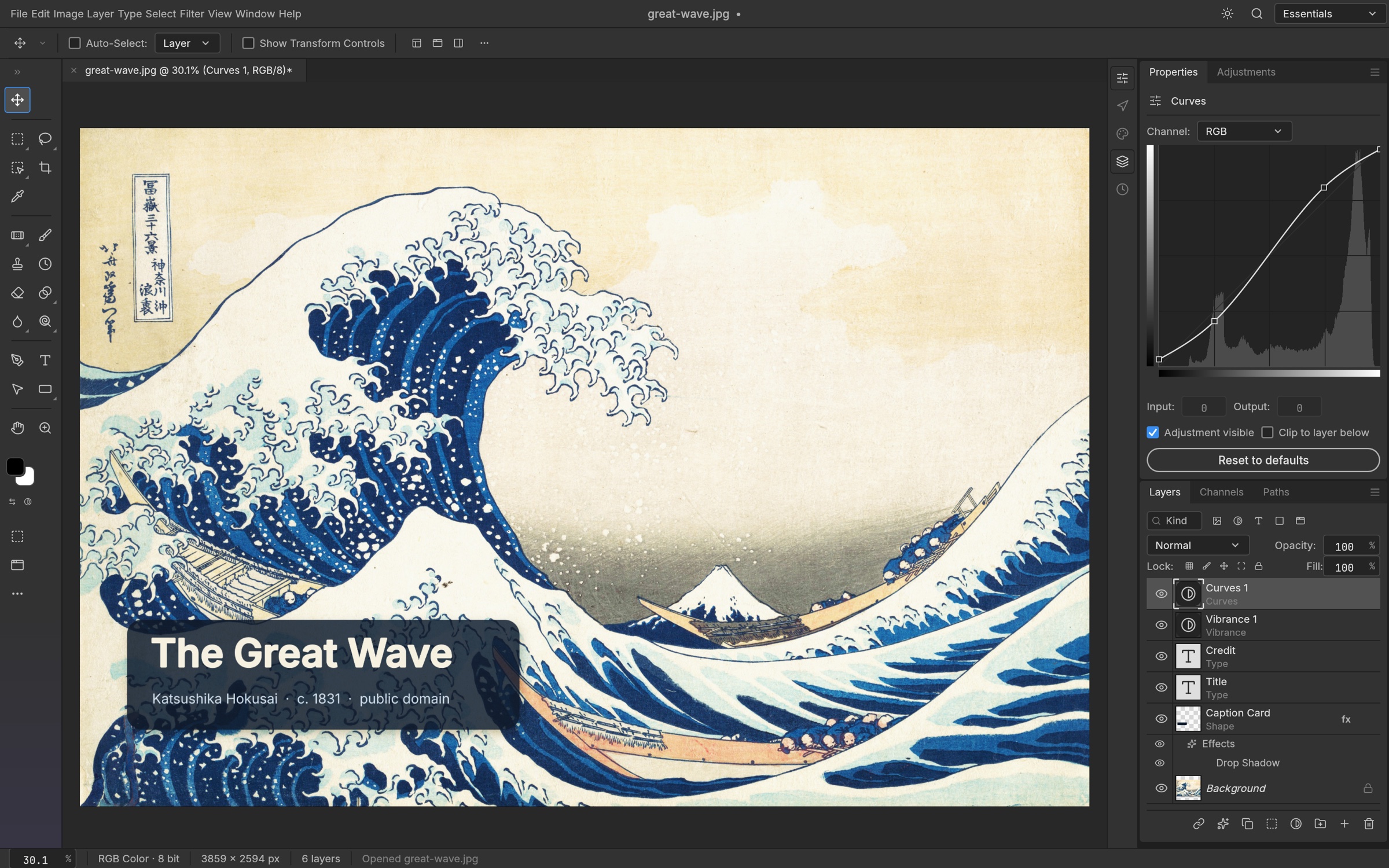
The interesting twist: the editor is also an automation engine
PhotoCraft exposes commands through its interface, CLI, JSON control channel and MCP integration. The control protocol can inspect UI state, execute commands, drive pointer events and capture screenshots. Its local control server uses authentication; the MCP bridge can connect an agent to the running app.
This creates a useful loop: an agent can perform an action, inspect the resulting document or interface, and collect evidence of what changed. It also opens a route to automating creative work after development. Having a control channel does not prove that every operation is correct, but it makes repeatable checks possible.
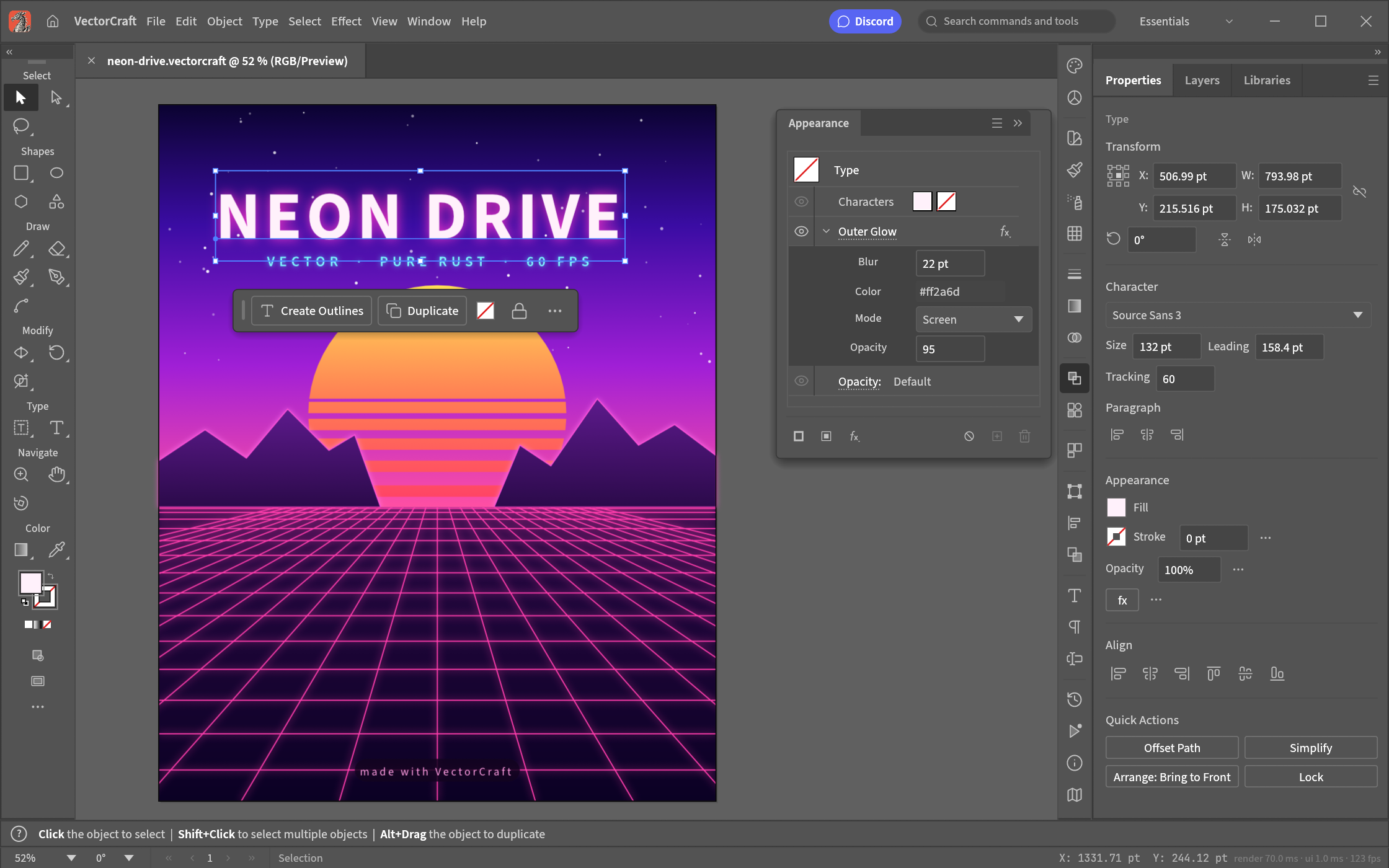
VectorCraft’s published Neon Drive example shows the same emphasis on familiar working tools: selected type, an Appearance panel and a live Outer Glow effect.
Open source? Yes for the seven apps—with a separate studio license
The Crafting Apps publish their code under MIT/Apache-2.0 licenses. PhotoCraft and VectorCraft explicitly offer either license. That makes the code available to inspect, fork, modify and redistribute under the chosen license’s terms. Fonts, artwork and branding can have separate terms; the source-code license is not a blanket license for every asset.
The ArtCraft AI studio is a separate product and repository. Although the homepage uses open-source wording, the studio’s reviewed LICENSE.md calls it fair source and restricts commercial resale, competing products and removal of certain links or paid services. Do not assume that the seven apps’ permissive licenses apply to that repository.
Thomas says the existing filmmaker-software team will support the apps. ArtCraft also offers paid model access. The plausible business rationale is that free editors build an audience for creative services; that is our interpretation, not evidence of future revenue or a guarantee of permanent maintenance. Free editor code does not make external model inference free.
- ArtCraft: the seven Crafting Apps
- PhotoCraft: Rust workspace and MIT OR Apache-2.0 license
- PhotoCraft: features, PSD tests and early-alpha status
- ArtCraft AI studio: separate fair-source license
- Developer announcement: AI tools, experience and funding (Reddit)
- ArtCraft: controllable AI image and video studio
The number to distrust: “100% parity”
At the reviewed revision, PhotoCraft’s generated report lists 627 of 627 menu items connected to commands. That is menu wiring. A button having a handler does not establish correct output, usable interaction or compatibility with a professional workflow.
The team’s own October 5 assessment says true Photoshop parity is well below 50%, and estimates daily professional switching readiness at roughly 25–35%. Those are project estimates, not our benchmark. It identifies gaps in AI features, tools, typography, professional workflows and the plug-in ecosystem.
There is substantial implementation to inspect. The README reports more than 1,700 tests and preserved renderings for 307 of 309 psd-tools corpus files after opening and re-saving. Those are self-reported, scoped results: they do not mean universal PSD fidelity, and a document-model save is not byte-identical to the original.
The launch promise was full parity within a month. Thomas later said on Hacker News that 99% parity would take months rather than years. Both statements describe ambition. We reviewed public code and documentation, but did not run the seven apps, reproduce their test suites or benchmark them against Adobe.
Why this is an engineering story worth following
Our conclusion is that this is a meaningful example of an experienced developer using agents to attempt a very large, already-understood product surface. Familiar menus and published formats give the work a concrete target. Native Rust, command-driven architecture and visible limitations make the result more interesting than a screenshot-only imitation.
The remaining work is exactly where professional tools earn trust: preserving files, handling unusual inputs, matching rendering, recovering from failure and fitting the habits of people who use them all day. Producing more code quickly does not remove those obligations. It increases the value of clear specifications, reproducible bug reports and careful review.
If you want to explore the project, choose one app and one realistic task. Work on copies of files, follow the actual workflow from import through edit to export, reopen the output in your existing tool and record what changed. That is a more useful contribution than debating an undefined parity percentage. A polished example demonstrates a possibility; a reproducible failure gives the team a next action.
- For image editing: check layer names, masks, text, effects and the rendered result after a save and reopen.
- For vector work: check editable paths, text, gradients and export behavior on your own sample.
- For a bug report: include the app version, operating system, minimal input, exact steps and expected versus actual output.
- For code study: trace one action through the interface, command engine and format or rendering code, then read the corresponding check.
Quick answers
Frequently asked questions
Did ArtCraft reverse-engineer Adobe’s source code?
The project describes reimplementing observed behavior and public specifications, with proprietary code and assets prohibited. The reviewed sources do not establish decompilation or copying Adobe source. We have not independently audited implementation provenance.
Are the apps open source and written in Rust?
Yes: the seven Crafting Apps publish Rust code under MIT/Apache-2.0 licenses. PhotoCraft’s native egui/wgpu stack and WebAssembly build are documented. The separate ArtCraft AI studio uses a more restrictive fair-source license.
Can they replace the Adobe suite today?
Full professional parity has not been established. PhotoCraft explicitly remains early alpha, and its own assessment lists major gaps. Evaluate the particular version and workflow you need; menu coverage does not measure product readiness.
Is PdfCraft the same project as PrintCraft?
Yes. Earlier announcements and parts of the website use PrintCraft; the reviewed repository and PhotoCraft README use PdfCraft. The former storytold/printcraft GitHub URL redirects to storytold/pdfcraft.
Source notes
References and review policy
Information checked on October 8, 2026. Section links identify sources for factual claims and technical explanations. Interpretations, practice scenarios and preparation recommendations are RecallDeck’s editorial work.
- Brandon Thomas: founder profile on GitHub
- Developer announcement: AI tools, experience and funding (Reddit)
- Developer replies and early user feedback (Reddit)
- Brandon Thomas: Claude Code, occasional Codex and code review (HN)
- Brandon Thomas: Opus 5.5 and the cancellation-fee motivation (HN)
- Developer follow-up: parity will take months (HN)
- ArtCraft: the seven Crafting Apps
- ArtCraft: controllable AI image and video studio
- PhotoCraft: contributor and AI-agent rules
- PhotoCraft: architecture and document engine
- PhotoCraft: Rust workspace and MIT OR Apache-2.0 license
- PhotoCraft: JSON control channel and MCP bridge
- PhotoCraft: features, PSD tests and early-alpha status
- PhotoCraft: honest parity assessment
- PhotoCraft: generated menu-wiring coverage
- PhotoCraft: corpus and development checks
- ArtCraft AI studio: separate fair-source license
- ArtCraft Team / PhotoCraft: original screenshot
- PhotoCraft: artwork sources and credits
- ArtCraft Team / VectorCraft: original screenshot
- PhotoCraft — Photoshop-style image editing
- VectorCraft — Illustrator-style vector graphics
- FilmCraft — Premiere-style video editing
- LightCraft — Lightroom-style photo and RAW workflows
- PdfCraft (formerly PrintCraft) — Acrobat-style PDF workflows
- EffectCraft — After Effects-style motion graphics
- DesignCraft — InDesign-style page layout
From reading to recall
Practice the full interview loop.
RecallDeck schedules the concepts you miss and keeps coding, design, and behavioral fundamentals available when the interviewer changes direction.